
Fall Alert – My Medic Watch
My Medic WatchMedical
3.122.00 Reviews
- Version
- F-2.2.11
- Installs
- 10.00K
- Age Rating
- Everyone
Screenshots
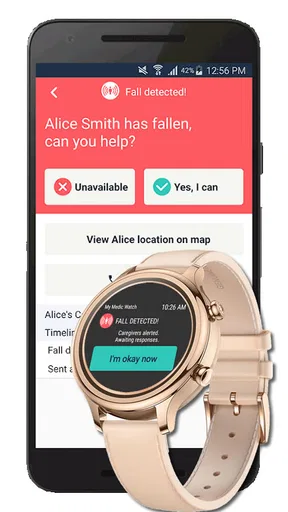
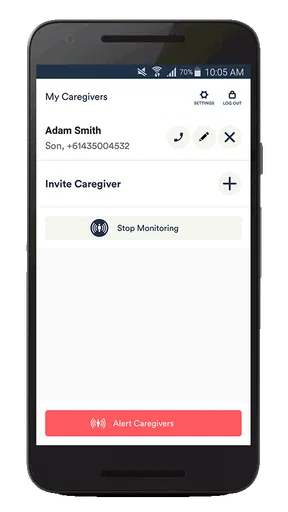
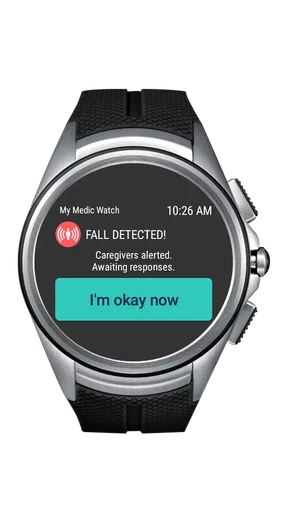
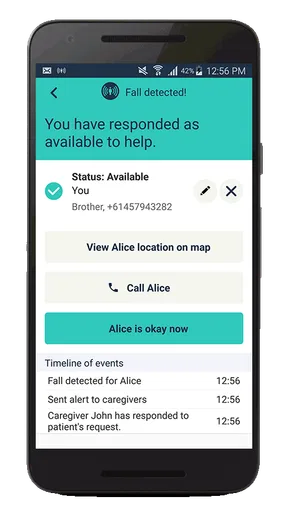
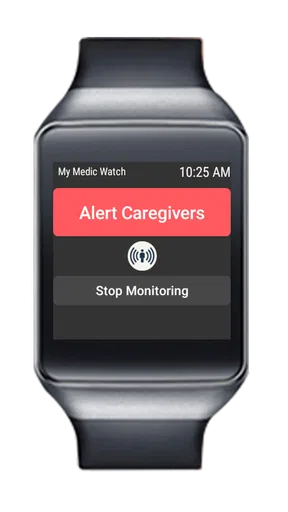
Our Review of Fall Alert – My Medic Watch
 Analysis by Appyee
When a fall happens at home, the difficult part is often not the impact itself but the delay before somebody notices. I looked at Fall Alert – My Medic Watch with that everyday problem in mind: an older person moving around the house, a relative in another room, or a household where people want an extra layer of awareness without turning every moment into a medical procedure. The app belongs to the medical category and focuses on automatic fall detection, with a short store description that keeps the promise simple: Fall Alert.
My overall impression is that this is a focused tool rather than a complete personal emergency service. It can make sense for someone who wants fall-related assistance on a compatible mobile setup, especially when family members already have a practical way to stay in contact. It is less convincing as a standalone answer to every home-safety concern. A phone can be misplaced, left charging, carried in a bag, or separated from the person who needs it, and no detection system should be treated as a replacement for sensible supervision or professional medical support.
How Fall Alert fits into a shared household
The most useful way to think about Fall Alert is as part of a household routine. Imagine a parent spending the afternoon alone while an adult child is at work. The parent keeps the phone with them during normal movement around the home, and the family has already agreed on what to do if an alert appears. In that situation, automatic detection may reduce the time between an incident and a check-in. Its value comes not only from the detection itself, but from the response plan built around it.
That response plan should be decided before anyone depends on the app. Who checks the phone first? Who calls the person? Who contacts a neighbor or emergency service if there is no answer? These questions are more important than simply installing an app and assuming the household is protected. Fall Alert can support communication, but the people around the user still need to understand their part.
Shared-device use needs particular care. If several people use one phone or tablet, the device should remain with the person whose movement the app is intended to monitor. A phone left on a kitchen counter may be perfectly usable for calls, yet useless for detecting an event that happens in a bedroom or bathroom. I would not treat a communal device as a reliable arrangement unless the household can keep it with the right person throughout the day.
There is also a practical issue with interruptions. A shared phone may be used for streaming, games, work calls, or another family member’s messages. Even when an app is installed correctly, a household should make sure that ordinary device habits do not quietly defeat its purpose. Keeping the phone charged, carrying it consistently, and checking that the app remains ready are simple steps, but they are central to whether the setup is meaningful.
For a couple living together, the boundaries are clearer when each person has their own device and the household knows whose device is being monitored. If one phone moves between two people, an alert may be difficult to interpret. Was it connected to the intended user? Was the other person carrying it? That uncertainty can turn a helpful warning into a confusing conversation at exactly the wrong time.
What the setup can and cannot promise
Fall detection sounds straightforward, but real movement is messy. A person may sit down heavily, drop the phone, stumble without falling, or fall in a way that the device does not interpret as expected. Conversely, a sudden movement may create a false alert. I see this as the central trade-off: automatic monitoring can notice an event without the user pressing a button, but it cannot understand every situation with human judgment.
That is why I would test the household workflow without deliberately creating a dangerous fall. Open the app, confirm that the intended user knows how to carry the device, and rehearse the call or check-in process. The goal is not to stage an impact. The goal is to discover whether the family knows what an alert means, who will respond, and how the user can explain that they are safe if an alert is mistaken.
Account boundaries matter just as much. The person wearing or carrying the device should know which account or profile is active and whether the app is being used for them rather than for another household member. I would avoid casually switching users on a shared phone, because a monitoring tool becomes difficult to trust when nobody is sure whose information or activity it represents.
Fall Alert is free to install, which makes trying its basic workflow less intimidating. The app also includes in-app purchases ranging from $2.99 to $130.00 per item. That wide range means I would inspect the purchase screen carefully before committing to anything. A family should understand what a paid option changes, whether it is needed for its intended use, and who controls the purchase decision. For a medical-oriented app, cost clarity is part of responsible household planning.
Coordination is where the real value appears
An alert is only useful if it leads to an appropriate action. In my view, the strongest use case is not “install it and forget it,” but “install it and agree on a response.” A relative might call the user first, then contact someone nearby if the call is unanswered. Another household may decide that a neighbor is the fastest person to check in. The right arrangement depends on distance, mobility, and the seriousness of the user’s health concerns.
Families should also agree on how to handle false alarms. If the user receives repeated calls after harmless movements, they may become frustrated and stop carrying the phone. A calm check-in phrase can help: the responder asks whether the person is safe, whether they are injured, and whether help is needed. This keeps the alert from becoming an accusation or a source of panic.
One non-obvious benefit of this kind of planning is that it exposes gaps in the household’s wider communication system. Perhaps the relative who normally responds works night shifts. Perhaps the neighbor is away on weekends. Perhaps the older user does not hear a ringing phone from another room. Testing the routine can reveal these weaknesses before an actual emergency, even though the app itself cannot solve them.
I would also keep the response chain short. A complicated chain involving many people can create the illusion of coverage while everyone assumes somebody else is acting. One primary contact and one backup contact are easier to remember than a long list. The app can be the trigger, but the household should keep its human procedure simple enough to follow under stress.
Another useful habit is to review the arrangement after changes in daily life. If the user starts spending more time outside, changes rooms, shares the phone with someone else, or begins using a different device, the old routine may no longer fit. Fall Alert should be treated as one part of an evolving safety plan rather than a permanent installation that never needs attention.
Age, trust, and the user’s comfort
The content rating is Everyone, but the practical audience is more specific. The app may appeal to older adults, people with balance concerns, and relatives who want an additional way to notice a possible fall. Still, suitability depends on comfort with smartphones. A person who dislikes carrying a phone may resist the entire setup, while someone who already keeps a device nearby may accept it easily.
Trust is especially important with medical technology. I would explain the app in plain language rather than presenting it as a guarantee. Saying “this may help us notice a possible fall” is more honest than saying “this will always get help.” That distinction protects the user from false confidence and makes it easier to discuss the app’s limitations without making them feel watched or helpless.
For an older family member, the best setup is one they understand and accept. Installing monitoring software without explaining who will respond can feel intrusive. A conversation about privacy, device ownership, and who receives information should happen before regular use. Fall Alert may be intended to support independence, but it can undermine that goal if the user feels controlled by an unclear household arrangement.
There is a similar issue with children or younger users. The Everyone rating does not automatically make the app appropriate for every child or situation. A parent should consider whether fall detection addresses the actual risk, whether the child can keep the device with them, and whether an adult is genuinely available to respond. For sports, outdoor activities, or high-risk medical conditions, a purpose-built solution may be more suitable than relying on a general phone-based workflow.
The developer is My Medic Watch, and the app has been available since April 8, 2019. Its current version is F-2.2.11. Those details suggest a product with an established presence rather than a brand-new experiment, but they do not remove the need to judge the app against the user’s specific routine. I would still test it in the actual environment where it will be used, because a medical app’s practical value depends heavily on habits and surroundings.
How it compares with ordinary alternatives
The usual alternative is a manual emergency call or a phone contact shortcut. That approach is familiar and gives the user direct control, but it depends on the person being conscious, able to reach the phone, and able to decide whom to call. Fall Alert’s automatic approach is attractive precisely because it aims to reduce that burden after a fall. The trade-off is that automatic detection may misinterpret movement, and the user has less direct control over when an alert is initiated.
Another alternative is a wearable emergency button. A wearable can be easier to keep on the body than a phone, particularly around the house, and its purpose may be immediately obvious to the user. On the other hand, a separate device can add cost, charging duties, and another object to remember. Fall Alert is more appealing when the user already carries a compatible phone consistently and does not want to manage a dedicated pendant or button.
A smartwatch may offer a more natural body-worn experience for some people, but it also brings its own charging routine, compatibility questions, and learning curve. I would choose that route when continuous wearing is more realistic than carrying a phone. I would choose Fall Alert when the household already has a workable phone habit and wants to explore automatic fall-related support without adding another piece of hardware.
None of these options is automatically superior. A person who spends time in a garden, walks far from the phone, or regularly leaves devices in another room may be poorly served by a phone-centered approach. Someone who is comfortable with a phone and has reliable family coordination may find the simpler setup preferable. The right choice is the one that remains present and usable during the moments when assistance might actually be needed.
What I would check before relying on it
Before making Fall Alert part of a safety routine, I would answer several practical questions through hands-on testing. Can the intended user carry the device throughout the day? Do they remember to charge it? Can they hear or notice an alert? Does the family know what to do next? If any answer is uncertain, the household should fix that weakness first rather than assuming the app will compensate for it.
I would also check how the app fits into the user’s normal movement. A person who frequently transfers from a bed to a chair, uses a walker, climbs stairs, or performs exercises may generate movements that need careful observation during the trial period. The purpose is not to chase a perfect result, but to learn whether the household can distinguish a meaningful warning from an accidental one.
Do not use a test fall to prove the system works. A safer evaluation involves ordinary device handling and a rehearsed response. If someone has a serious medical risk, professional advice should guide the broader safety plan. An app can be a useful layer, but it should not replace prescribed equipment, clinical guidance, or emergency services when those are needed.
The app’s average rating is 3.1 from around 77 ratings, with around 22 written reviews. I read that as a reason to approach it with realistic expectations rather than as a simple endorsement or rejection. A modest rating can reflect differences in phones, household routines, expectations, and individual experiences. For this type of app, the important question is whether its workflow fits the person who will depend on it.
It has passed 10K installs, which gives it some visibility among people looking for fall-related support. That is useful context, but adoption alone does not tell me whether it is right for a particular home. The app’s strongest argument is its focused purpose; its weakest point is the number of conditions that must all be right around it: the correct user, the correct device, consistent carrying, sensible coordination, and a responder who is actually available.
My household verdict
I would recommend trying Fall Alert – My Medic Watch for a household that wants an extra fall-detection layer and already has dependable phone habits. It is particularly reasonable when an older relative carries a phone naturally, lives with or near people who can respond, and understands that an alert is a prompt to check in rather than a guaranteed emergency dispatch.
I would be more cautious for anyone who frequently leaves the phone behind, lives alone without a reachable responder, or needs a medically supervised monitoring arrangement. In those cases, a wearable emergency service, professional care plan, or another dedicated solution may offer a better match. The app should not be selected simply because it is free to start; the household must be able to support the routine around it, including any optional purchase it considers.
My final view is positive but measured. Fall Alert addresses a real household concern with a direct idea, and automatic detection can be more useful than relying entirely on a manual call after a fall. Its success, however, depends less on the name of the feature than on everyday discipline: carrying the device, keeping expectations honest, agreeing on contacts, and respecting the user’s comfort and independence.
The best reason to use Fall Alert is not the promise of perfect detection; it is the chance to create a clear, practiced response when a possible fall happens. If your household can maintain that approach, the app is worth considering. If the phone will be shared, forgotten, or left out of reach, I would choose a solution designed around a device that stays on the person instead.
Verdict
Strengths of Fall Alert – My Medic Watch
- Automatically detects falls and can alert emergency contacts quickly.
- Offers 24/7 monitoring support for added reassurance when alone.
- Designed for older adults and people at risk of falling.
- Can provide useful incident details to responders after a fall.
- May help families feel more confident about independent living.
Limitations of Fall Alert – My Medic Watch
- Some features may require a paid subscription or monitoring plan.
- Accurate detection depends on wearing and positioning the device correctly.
- False alarms may occur during sudden movements or strenuous activity.
- Requires a compatible smartphone and an active mobile or Wi‑Fi connection.
- Battery charging and phone availability are essential for reliable alerts.
Other Releases by My Medic Watch
View All
Seizure Alert – My Medic Watch
Medical2.6
Similar Picks in This Category
View All
WebMD: Symptom Checker
WebMD, LLC4.1

Microphone Amplifier
DOSA Apps4.2

Anatomy Learning - 3D Anatomy
3D Medical OU4.5

Period Tracker and Calendar
SimpleInnovation4.9

GoodRx: Prescription Coupons
GoodRx4.8

CVS Health
CVS Pharmacy4.5
Frequently Asked Questions
What is Fall Alert – My Medic Watch, and how does it work?
Fall Alert – My Medic Watch is a personal safety and medical alert app designed to help detect possible falls and connect the user with assistance. After setup, it can use compatible device sensors and the phone’s connectivity to identify a fall event. Depending on the selected service and configuration, it may notify emergency contacts or a monitoring team, while also providing useful location and medical information.
Does Fall Alert – My Medic Watch automatically contact emergency services after a fall?
The app should not be treated as a guaranteed replacement for calling emergency services. Its response depends on the subscription, country, device compatibility, network connection, permissions, and the way the service is configured. Before relying on it, carefully check whether your plan includes professional monitoring, who receives alerts, and what happens when a suspected fall is detected.
What devices and permissions are required to use the app?
Fall Alert – My Medic Watch generally requires a compatible Android or iOS smartphone and may work with supported wearable or monitoring equipment, depending on the service package. It can require access to motion sensors, location, notifications, microphone, phone functions, Bluetooth, and background activity. Keeping these permissions enabled is important because restricted access, battery-saving settings, or a disconnected wearable may reduce reliability.
Can the app detect every fall accurately?
No fall-detection application can identify every incident perfectly. Detection may be affected by the type and force of the fall, how the phone or wearable is being carried, movement after the incident, battery level, connectivity, and sensor limitations. False alarms are also possible. Users should review the alert process, respond promptly to confirmation prompts, and keep an alternative way to request help available.
Is Fall Alert – My Medic Watch suitable for elderly people or users with medical conditions?
The app may be useful for older adults, people living alone, or users who are concerned about falls, but suitability depends on individual needs and the available service in their region. Setup should be completed with a trusted family member, caregiver, or healthcare professional when possible. Personal details, emergency contacts, medical information, and location settings should be checked regularly to ensure alerts contain accurate information.
